The Trade Assistant Indicator for MT4 is a powerful multi-indicator tool designed to help traders identify potential buy and sell trading opportunities by combining several popular momentum oscillators into one interface.
Instead of relying on a single indicator, the Trade Assistant analyzes market conditions using multiple technical indicators simultaneously. It uses the Relative Strength Index (RSI), Stochastic Oscillator, and Commodity Channel Index (CCI) to generate trading signals and display them clearly on the chart.
By combining these indicators, the tool provides traders with a comprehensive view of market momentum, helping them make more informed trading decisions.

How the Trade Assistant Indicator Works
The indicator analyzes signals from three major momentum oscillators:
- RSI
- Stochastic
- CCI
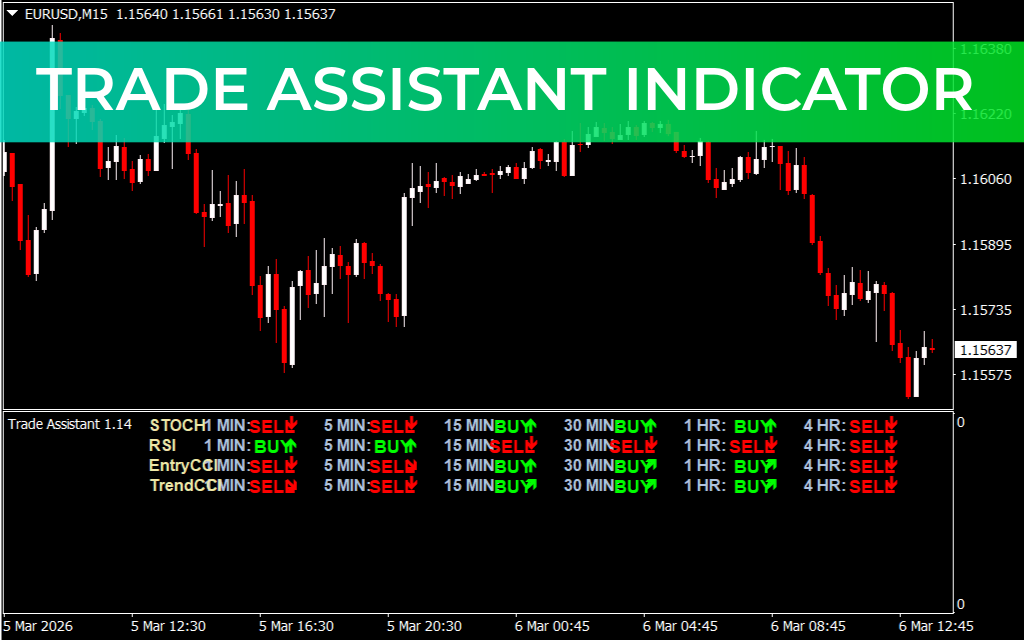
Each indicator produces its own BUY or SELL signal, which is displayed on the left side of the indicator panel.
Additionally, the indicator supports multi-timeframe analysis, showing signals across several timeframes ranging from M1 (1 minute) to H4 (4 hours). This allows traders to quickly compare signals from different market perspectives.
For example:
- RSI may indicate BUY on the H1 timeframe
- Stochastic may indicate SELL on the M15 timeframe
- CCI may indicate BUY on the H4 timeframe
This multi-timeframe overview helps traders better understand overall market sentiment.
Example of Indicator Usage
On a USD/JPY chart in the H4 timeframe, the Trade Assistant Indicator displays several BUY and SELL signals generated by the included oscillators.
The indicator panel typically shows:
- Indicator names on the left (Stochastic, RSI, CCI)
- Timeframes across the top (M1 to H4)
- BUY/SELL signals within each timeframe
This layout makes it easy for traders to identify momentum alignment across different timeframes.
How to Trade With the Trade Assistant Indicator
To use the indicator effectively, traders should look for signal confluence between multiple indicators and timeframes.
Basic Strategy
- Check if multiple oscillators show the same signal.
- Confirm the signal using the higher timeframe trend.
- Enter the trade in the direction of the confirmed trend.
Additional Confirmation Tools
For better accuracy, combine the indicator with other technical tools such as:
- Bollinger Bands for volatility and reversal signals
- Moving Average for trend direction
- Support And Resistance zones
- Price Action patterns
Using these confirmations helps filter out false signals, especially during sideways markets.
Key Features of the Trade Assistant Indicator
- Combines multiple momentum indicators in one tool
- Displays individual BUY and SELL signals for each oscillator
- Supports multi-timeframe analysis (M1 to H4)
- Easy visual layout for quick decision making
- Suitable for Scalping, intraday, and swing trading
- Compatible with the MetaTrader 4 platform
Why Traders Use the Trade Assistant Indicator
Many traders rely on several indicators at once, which can clutter the chart and slow down analysis. The Trade Assistant Indicator solves this problem by organizing multiple signals into a single panel, allowing traders to quickly evaluate market momentum.
This makes it particularly useful for traders who prefer multi-indicator confirmation strategies.
Conclusion
The Trade Assistant Indicator for MT4 is a versatile trading tool that combines the power of RSI, Stochastic, and CCI to provide clear multi-timeframe buy and sell signals. By displaying signals from several indicators in one place, it helps traders analyze the market faster and more efficiently.
When used together with trend indicators and proper risk management, it can significantly improve trade confirmation and market analysis.
FAQ
17 Downloads
Published:
Mar 06, 2026 07:49 AM
Category: