The Forex Trend Indicator for MT4 is a powerful trend oscillator designed to monitor changes in market momentum and generate clear buy and sell signals. It visually displays the current market trend using color-coded bars, making it easy for traders to quickly understand the direction of the market.
One of the key advantages of this indicator is its simple and intuitive design, which allows traders to identify trend conditions instantly. At the same time, it provides consistent signals that can help traders capture profitable trend-following opportunities.

The indicator performs well on both short and long timeframes, making it suitable for a wide range of trading strategies.
How the Forex Trend Indicator Works
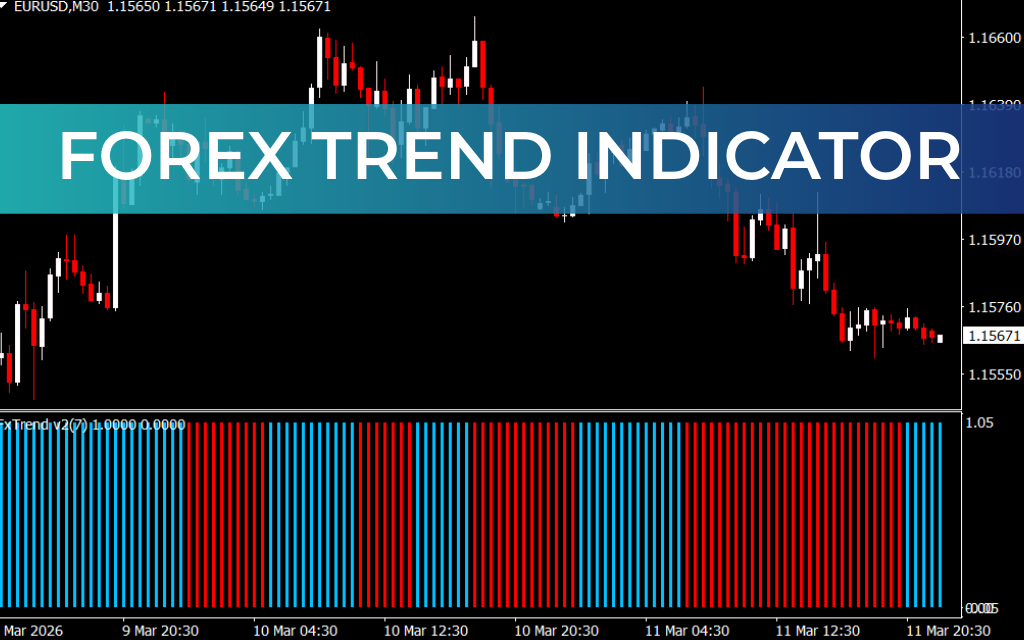
The Forex Trend Indicator uses a color-based system to display the current market trend. Instead of complex calculations or signals, it simply plots colored vertical bars in a separate indicator window.
- Blue Bars – Indicate a bullish trend (uptrend)
- Red Bars – Indicate a bearish trend (downtrend)
When the indicator changes bar color, it typically signals a potential Trend Reversal.
The longer the indicator continues to plot bars of the same color, the stronger the current trend momentum becomes.
For example, if several blue bars appear consecutively, it suggests the market is experiencing strong bullish momentum and traders may look for buy opportunities.
Key Features of the Forex Trend Indicator
The Forex Trend Indicator offers several benefits for traders:
- Generates clear buy and sell signals
- Easy-to-read color-coded trend display
- Works on multiple timeframes
- Suitable for Scalping, day trading, and intraday strategies
- Compatible with forex, stocks, metals, and cryptocurrencies
- Beginner-friendly interface
Because of its simplicity, the indicator is an excellent tool for traders who want quick insight into market momentum and Trend Strength.
How to Use the Forex Trend Indicator in MT4
The Forex Trend Indicator is very easy to use. Traders only need to monitor the color of the bars in the indicator window.
Buy Signal
A BUY signal appears when the indicator starts plotting blue bars.
Trading steps:
- Wait for the indicator to change to blue bars.
- Confirm that the market shows bullish momentum.
- Enter a BUY (long) position.
- Hold the trade while the indicator continues showing blue bars.
Sell Signal
A SELL signal occurs when the indicator begins plotting red bars.
Trading steps:
- Wait for the indicator to switch to red bars.
- Confirm bearish momentum in the market.
- Enter a SELL (short) position.
- Hold the trade until the indicator changes color.
Improving Signals with Additional Indicators
Although the Forex Trend Indicator provides useful signals, traders often combine it with other tools to improve accuracy.
One common strategy is using a 50-period Exponential Moving Average (EMA) as a trend filter.
Example strategy:
- Buy only when the price is above the 50 EMA and the indicator shows blue bars.
- Sell only when the price is below the 50 EMA and the indicator shows red bars.
This approach helps filter weak signals and improves the probability of successful trades.
Traders may also combine the indicator with:
- Other trend-following indicators
- Price Action analysis
- Support and resistance levels
Conclusion
The Forex Trend Indicator for MT4 is a reliable tool for identifying changes in market momentum and trend direction. With its simple blue and red bar system, traders can easily recognize bullish and bearish market conditions.
The indicator works effectively across multiple timeframes and trading instruments, making it suitable for scalping, intraday trading, and long-term strategies. When combined with additional tools such as moving averages or price action analysis, it can significantly improve trading decisions.
FAQ
2 Downloads
Published:
Mar 11, 2026 17:46 PM
Category: